Best Portable Video Magnifiers

If you are reading this guide, you already know how much harder daily life gets when vision loss makes it difficult to read a menu, check a prescription label, or simply see a grandchild’s face clearly. You are not alone in this. A portable video magnifier can put a bright, crisp image right in your hands, without the bulk of a desktop unit. We have worked with hundreds of customers to find the right fit, and this guide shares what we have learned about the 10 best options available today. For more context on the broader category, see the full digital magnifier buyer’s guide.
How to Choose a Portable Video Magnifier
There is no single best portable video magnifier. The right choice depends on how you plan to use it and what your eyes need most. Here are the five factors that matter most.
Screen size. Smaller screens (3.5 to 5 inches) slide easily into a coat pocket. Screens in the 7- to 12-inch range give you more viewing area, which many people with macular degeneration prefer for reading. Larger fold-flat screens (13 to 17 inches) behave more like a desktop unit you can carry to work or school.
Magnification range. Most portable video magnifiers offer 2x to 22x digital magnification. If you primarily read standard print, the mid range (5x to 10x) covers most tasks. If you deal with very small print or significant central vision loss, choose a device that goes higher.
Battery life. Plan for your real day. A morning of errands may need only two hours. A full school or workday needs five or more. Check the manufacturer’s stated battery life, then subtract about 20 percent for real-world use at higher brightness.
Weight and portability. Handheld units weigh under a pound. Fold-flat desktop portables weigh six to nine pounds. If you carry a device all day, weight matters as much as screen size.
Color modes and contrast settings. High-contrast modes, such as white text on black or yellow on black, can dramatically reduce eye strain. Nearly all video magnifiers on this list offer at least 10 viewing modes. If contrast sensitivity is your primary challenge, prioritize this feature.
Not sure whether you need an electronic magnifier or a simpler optical option? You can compare optical handheld magnifiers (no screens, no batteries) or browse non-electronic magnifying glasses for everyday reading to weigh the tradeoffs.
Summary: Top 10 Portable Video Magnifiers
The table below summarizes key specs for each magnifier reviewed in this guide. Detailed reviews follow.
| # | Magnifier | Screen Size | Battery Life | Best For |
|---|---|---|---|---|
| 1 | explorē 12 | 12″ | ~3.5 hrs | Students and active users |
| 2 | explorē 8 | 8″ | ~4 hrs | On-the-go reading |
| 3 | CloverBook Pro | 15.6″ | ~5 hrs | Desk work and long reading sessions |
| 4 | CloverNote HD | 12.5″ | ~5 hrs | Meetings and presentations |
| 5 | MagniLink Zip Premium 13″ | 13.3″ | 5-9 hrs | Classroom and office portability |
| 6 | Reveal 16i | 16″ | ~4 hrs | Ease of use, extended reading |
| 7 | MagniLink iTAB | iPad-based | iPad battery | Tech-savvy users, iPad owners |
| 8 | Merlin Mini | 15.6″ or 17.3″ | ~5 hrs | Desktop-quality portability |
| 9 | CloverBook LITE | 12.5″ | ~5 hrs | Hobbyists and home readers |
| 10 | MagniLink One | Varies by model | ~4 hrs | Simple, reliable daily use |
Detailed Reviews of the Top 10 Portable Video Magnifiers
Each review below includes a “Best for” note to help you quickly identify the right fit for your situation.
1. explorē 12 Portable Electronic Video Magnifier
Best for: Students and active users who need a large screen they can carry between classes or appointments.
 The explorē 12 features a 12-inch touch screen with full HD image quality for both near and distance viewing. Whether you are reading, writing, or following a presentation, the large display makes navigation comfortable without constant repositioning.
Its 3.5-hour battery and lightweight design make it practical for a full morning out. Live panning and customizable color modes let you adjust the image for whatever lighting you are in. An optional folding stand adds stability for extended desk use.
- 12-inch HD touchscreen
- Near and distance camera modes
- Customizable color and contrast settings
- ~3.5-hour battery life
- Optional folding reading stand
2. explorē 8 Handheld Portable Video Magnifier With Stand
Best for: People who want a lighter, pocketable screen for reading on the go.
 The explorē 8 has an 8-inch HD touchscreen that stays comfortable in one hand. Adjustable magnification and customizable contrast settings let you tailor the image to your specific needs, whether you are reading a book or checking a price tag at the store.
The included stand converts it to a hands-free setup for writing or crafting. Distance viewing lets you zoom in on objects or signs across the room. Its long battery life makes it reliable for full days away from home.
- 8-inch HD touchscreen
- Lightweight, ergonomic handheld design
- Distance and close-up viewing
- Hands-free stand included
- Indoor and outdoor use
3. CloverBook Pro Portable Video Magnifier
Best for: People who need a large screen for extended reading sessions or desk work at home, work, or school.
 The CloverBook Pro folds flat for transport and opens to a 15.6-inch full HD display. Its second-screen feature lets you read a document on one screen while keeping an overview on the other, which is useful for longer reading tasks or side-by-side comparisons.
Multiple camera modes, including distance and self-view, make it versatile for a range of daily tasks. Customizable contrast and color settings keep extended reading sessions comfortable. This is one of the most full-featured portable magnifiers on the market.
- 15.6-inch full HD display
- Innovative dual-screen functionality
- Distance, close-up, and self-view camera modes
- Foldable, portable design
- ~5-hour battery life
4. CloverNote HD Handheld Magnifier With Camera Arm
Best for: People who attend meetings or classes and need to switch quickly between reading documents and viewing a board or screen.
 The CloverNote HD has a 12.5-inch HD touchscreen and an adjustable camera arm that positions for close-up, distance, and self-view. This flexibility makes it useful for reading documents, attending meetings, or following presentations all in one session without swapping devices.
Its foldable design makes transport straightforward. Customizable magnification, contrast, and color modes let people with different visual needs configure the display to their preference. The intuitive interface keeps things manageable even for new users.
- 12.5-inch HD touchscreen
- Adjustable camera arm for multiple viewing angles
- Close-up, distance, and self-view modes
- Foldable, portable design
- ~5-hour battery life
5. MagniLink Zip Premium 13″ Full HD Portable Magnifier
Best for: Students and professionals who need a reliable portable magnifier for classroom or office use across a full day.
 The MagniLink Zip won the prestigious Red Dot Design Award for its balance of function and portability. Its 13.3-inch screen delivers true-color images with full HD clarity. The low-vision-adapted display and a Full HD reading/distance camera that rotates both vertically and horizontally give you a flexible setup for any environment.
Weighing under 9 pounds with a protective carrying case included, it travels well. The 5- to 9-hour battery life is one of the best in this category, covering a full school or work day comfortably.
- 13.3-inch true-color HD screen
- Rotating Full HD reading and distance camera
- 5 to 9 hours battery life
- Foldable, lightweight design with carrying case
- Red Dot Design Award winner
6. Reveal 16i Portable Video Magnifier With Speech
Best for: People who want a large screen with simple controls and built-in text-to-speech for reading longer documents.
 The Reveal 16i has only four buttons, making it one of the simplest video magnifiers to learn. Its 16-inch screen gives you generous viewing space for reading books, newspapers, or documents without eye strain. The 10x optical zoom camera delivers crisp, clear images in any lighting.
Beyond magnification, the Reveal 16i supports video chat, email, web browsing, and media playback, making it useful for staying connected as well as reading. The foldable design makes it easy to store between uses.
- 16-inch foldable display
- Only 4 buttons, simple to learn
- 10x optical zoom camera
- Text-to-speech and media capabilities
- Video chat and web browsing included
7. MagniLink iTAB Portable Low Vision Aid
Best for: People who already use an iPad and want to add high-quality magnification without carrying a separate device.
 The MagniLink iTAB pairs with an iPad Pro to deliver high-definition magnification through its HD camera. Its adjustable camera arm supports close-up, distance, and self-view positioning, making it flexible for reading, note-taking, and virtual meetings all on one device.
Compatibility with accessibility apps on the iPad gives users additional tools beyond basic magnification. Text-to-speech, customizable contrast settings, and intuitive touchscreen controls round out the feature set. If you already carry an iPad, this is one of the most practical solutions in this category.
- Pairs with iPad Pro
- HD camera with adjustable arm
- Close-up, distance, and self-view modes
- Text-to-speech and accessibility app support
- Lightweight, compact design
8. Merlin Mini Portable Video Magnifier
Best for: People who want desktop-quality magnification they can still take to another room or carry to a different location.
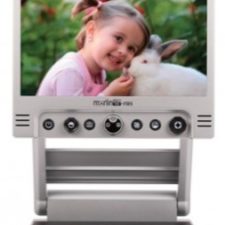 The Merlin Mini is available with either a 15.6- or 17.3-inch screen, giving you more display area than most portables in its class. A 3-in-1 rotating camera handles close-up reading, distance viewing, and self-view without requiring any manual lens adjustments. Full HD 1080p autofocus keeps the image sharp regardless of your distance from the subject.
Three selectable magnification ranges accommodate different eye conditions. An HDMI output lets you connect to a larger TV screen when you want even more viewing area at home. The 5-hour battery and foldable design keep it viable for transport.
- 15.6″ or 17.3″ full HD screen options
- 3-in-1 rotating camera
- Full HD 1080p autofocus
- HDMI output for TV connection
- ~5-hour battery life
9. CloverBook LITE Portable Video Magnifier
Best for: Home readers and hobbyists who want a large, comfortable screen without the weight or price of a full desktop unit.
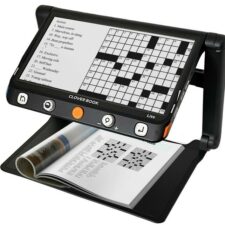 The CloverBook LITE has a 12.5-inch full HD touchscreen that makes reading newspapers, books, or photo albums noticeably easier. An integrated foldable stand sets it up quickly on any table, and tactile buttons give you a physical alternative to touchscreen controls when fine motor control is a challenge.
Adjustable contrast and magnification settings cover a wide range of vision needs. When you are done reading, it folds flat for compact storage or travel. This is a practical, affordable option for primarily home use.
- 12.5-inch full HD touchscreen
- Integrated foldable stand
- Tactile buttons and touchscreen controls
- Adjustable contrast and magnification
- Compact, foldable storage
10. MagniLink One Foldable Portable Video Magnifier
Best for: People who want a reliable, no-fuss portable video magnifier for everyday reading and daily tasks.
 The MagniLink One has a large anti-glare HD screen that makes text and images easy to read without reflections. Its foldable design sets up quickly and stores flat, making it a practical daily-use option at home or in the office. Adjustable magnification levels and contrast settings let you personalize the experience for your vision.
Intuitive controls make it easy to switch between viewing modes. The sturdy build holds up to regular use, and the lightweight frame means carrying it from room to room is not a burden. This is a dependable choice if you want simplicity and reliability above all.
- Large anti-glare HD screen
- Foldable, easy-to-store design
- Adjustable magnification and contrast
- Intuitive controls for switching modes
- Sturdy, lightweight frame
Frequently Asked Questions
What is a portable video magnifier?
A portable video magnifier is an electronic device with a built-in camera that captures what you point it at and displays the image on a screen, enlarged and with adjustable contrast. Unlike optical magnifiers, these devices work in any lighting condition and let you choose color modes that reduce eye strain. Most models fit in a bag or briefcase and run on a rechargeable battery.
How is a portable video magnifier different from a handheld magnifier?
A handheld magnifier uses glass or plastic lenses to enlarge what you see directly. A portable video magnifier uses a camera and screen, which means you can adjust the magnification level digitally and switch to high-contrast color modes. Video magnifiers generally provide higher magnification ranges and work better in low-light situations. If you are weighing both options, you can compare optical handheld magnifiers alongside this guide.
What screen size do I need?
For quick tasks like reading a label or a price tag, a 5-inch to 8-inch screen is usually sufficient. For extended reading, a 12-inch to 16-inch screen reduces eye fatigue and makes it easier to read full sentences at once. If you primarily use the device at a desk rather than on the go, a larger screen is almost always worth the added weight.
How much do portable video magnifiers cost?
Most portable video magnifiers range from $400 to $2,000. Smaller handheld units with 5- to 8-inch screens are typically at the lower end of that range. Larger fold-flat units with 15- to 17-inch screens and advanced features like dual-screen or text-to-speech tend to be priced higher. A low vision evaluation can help you avoid buying a device that does not match your actual needs.
Are portable video magnifiers covered by insurance?
Coverage varies widely. Traditional Medicare (Parts A and B) generally does not cover magnifiers as durable medical equipment, though some Medicare Advantage plans and state Medicaid programs have different rules. Some vocational rehabilitation programs cover devices for people who need them for work or school. Our team can help you navigate your specific coverage options. Contact us to ask.
How We Can Help
Choosing the right portable video magnifier is much easier when you can try it first. At New England Low Vision and Blindness, we offer complimentary, no-obligation demonstrations on all of the products in this guide. Our specialists come to you, whether at home, school, or work.
When you are ready to take the next step, schedule a low vision evaluation with one of our specialists. We will match you with the right device for your vision, your lifestyle, and your budget. Call us toll-free at 888-211-6933 or email info@nelowvision.com.
You can also browse magnifying glasses for everyday reading if you want to compare all your options in one place.