Top Low Vision Handheld Magnifiers

Finding the right handheld magnifier can feel overwhelming. There are dozens of options, and the differences between them are hard to sort through online, let alone compare side by side. If you or someone you love has recently been diagnosed with low vision, you are not alone in feeling unsure where to start.
This guide covers the 10 best handheld magnifiers for low vision. We have worked with these products directly with our customers, and we will walk you through exactly what to look for so you can find the one that fits your daily life.
How to Choose the Right Handheld Magnifier
Not every magnifier is right for every person. The best choice depends on what you are doing with it, how much magnification you need, and how you plan to carry it.
Magnification level. For most reading tasks, 3x to 7x magnification is enough. Reading medication labels or fine print may require 7x or higher. Digital models allow you to adjust on the fly, which is helpful if your needs vary.
LED lighting. A built-in light makes a real difference in lower-light settings like restaurants or stores. Most of the digital magnifiers on this list include LED illumination.
Optical vs. digital. Optical magnifiers use a glass lens and have no battery. Digital magnifiers display a camera image on a screen, allowing adjustable magnification and color contrast modes. For more detail on digital models, see our digital magnifier guide.
Size and weight. Pocket-sized models fit in a shirt pocket or small bag. Larger screen models, like 7- or 8-inch devices, are easier to read but take more room. Consider where you will use it most.
Battery life. For digital magnifiers, look for at least 3 hours of continuous use. Most of the models below offer 3 to 6 hours per charge.
Our Top 10 Handheld Magnifiers for Low Vision
Each magnifier below has been selected based on quality, ease of use, and how well it works for people with common low vision conditions including macular degeneration, glaucoma, and diabetic retinopathy.
1. Clover 6 Handheld Magnifier
Best for: Reading at home and on the go. 6-inch HD screen with up to 16x magnification and built-in stand for hands-free use.
 The Clover 6 Handheld Magnifier delivers sharp, high-contrast images on a compact 6-inch HD screen. Adjustable magnification up to 16x lets you customize the view for your specific needs.
Its touchscreen and tactile buttons are easy to navigate, and enhanced color modes improve contrast for better readability. The built-in stand provides stability for hands-free use at a desk or table.
Whether you are reading menus, labels, books, or newspapers, the Clover 6 makes everyday tasks more accessible. A strong choice for people with macular degeneration who need reliable magnification at home and away.
2. Ruby XL HD Handheld Magnifier
Best for: People who need a slim, pocketable magnifier with high-definition clarity. 5-inch screen, up to 14x magnification, freeze-frame image capture.
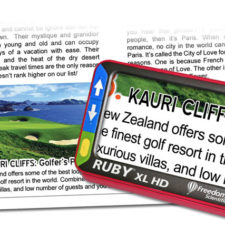 The Ruby XL HD fits comfortably in your hand while delivering crystal-clear HD magnification on a five-inch screen. Color-coded tactile buttons make it easy to adjust magnification and switch between color modes without looking at the controls.
The fold-out handle offers two grip positions, which is especially useful when reading prescription bottles or food packaging. A freeze-frame button lets you capture images to review, and USB connectivity allows you to transfer saved images to a computer.
This is one of the most popular choices among our customers who need a reliable, portable magnifier for daily reading tasks.
3. explorē 8 Handheld Magnifier With Stand
Best for: Extended reading sessions where a larger screen matters. 8-inch HD touchscreen with up to 30x magnification and an included adjustable stand.
 The explorē 8 Handheld Magnifier offers an expansive 8-inch HD touchscreen for crisp, high-contrast images. The adjustable stand lets you place it on a flat surface for hands-free reading of books, newspapers, and documents.
Customizable color contrast settings improve visibility, and the lightweight design makes it easy to carry when you need it away from home. Up to 30x magnification makes even the smallest print visible.
A great option for people who spend time reading at a desk and want the flexibility to use it handheld when out and about.
4. explorē 5 Handheld Magnifier
Best for: Active people who want a versatile, pocket-ready magnifier. Compact design, variable magnification, and color contrast modes for diverse vision needs.
 The explorē 5 Handheld Magnifier is designed for easy, immediate use straight from your bag or pocket. Large, bright buttons mean no instructions are needed to start using it right away.
Variable magnification and contrast settings make it a practical choice for people with mild, moderate, or significant vision changes. Whether you are reading menus, fine print on documents, or packaging at the store, the explorē 5 is built to keep up.
5. Mr. Magnifier 5 Handheld Magnifier
Best for: People who want a highly compact digital magnifier with wide magnification range. 2x to 32x on a small LCD screen with freeze-frame and image-saving capability.
The Mr. Magnifier 5 is small enough to slip into any pocket and ready when you need it. It offers multiple display modes, adjustable brightness, and a reading line you can overlay horizontally or vertically to help track text.
Freeze-frame and image-save features let you capture and review details like labels, price tags, and photographs. An excellent choice for shopping trips, travel, or anywhere you need quick, bright magnification.
6. Pebble HD Handheld Magnifier
Best for: People who want the lightest possible handheld magnifier. At just 7.2 ounces, the Pebble HD is the lightest in its class with HD imaging and a unique ergonomic handle.
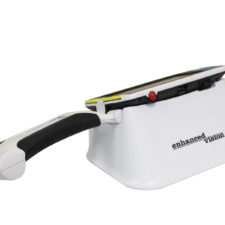 The Pebble HD combines HD imaging with a compact, lightweight design trusted by professionals and individuals alike. The unique “T” shaped handle provides ergonomic comfort and allows hands-free writing when set down on a surface.
Available in red, white, and blue, it clips onto a belt or fits easily in a purse or pocket. Expanded magnification ranges and a fully encased rechargeable battery make this a reliable daily companion.
7. Ruby 7 Handheld Magnifier
Best for: People who need near, far, and intermediate viewing in one device. The Ruby 7’s PivotCam rotating camera handles reading, distance, and middle-range tasks without switching devices.
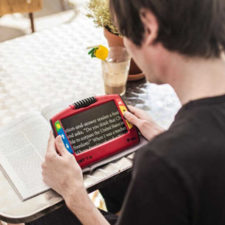 The Ruby 7 Handheld Magnifier features a 7-inch screen and up to 24x magnification. The PivotCam rotates to cover near, far, and middle-distance viewing, which is ideal for reading, writing, and spotting details across a room.
Twenty high-contrast color modes and adjustable reading lines help customize the experience for your vision. A built-in reading stand improves comfort during longer sessions, and the Freeze Frame feature lets you snap and hold an image for closer review.
Connect to a TV via the full-size HDMI port for an even larger view. At 18 ounces and with 3 hours of battery life, the Ruby 7 travels well.
8. Ruby HD Handheld Magnifier
Best for: Everyday reading tasks at home or on the go. Compact 4.3-inch widescreen display with up to 13x magnification and freeze-frame capability.
 The Ruby HD offers HD image quality in a compact, portable design. Multiple high-contrast color modes enhance readability, and the built-in LED lighting ensures consistent brightness in any environment.
An ergonomic grip and simple button controls make it easy to pick up and use immediately. The freeze-frame function lets you capture and review price tags, prescriptions, or any fine print you need a closer look at.
9. Amigo 8 Handheld Magnifier
Best for: People with color blindness or light sensitivity in addition to low vision. The Amigo 8’s Dynamic Contrast technology and specialized filters address multiple visual needs in one device.
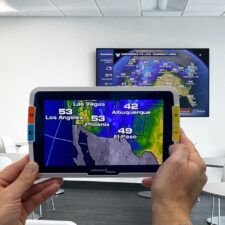 The Amigo 8 features an 8-inch widescreen LCD and Dynamic Contrast technology that sharpens images for clearer, more defined text. A dedicated second camera handles distance viewing, so you can read a menu or see a presentation across the room.
Color Blindness Filters and a Brightness Sensitivity Filter address visibility challenges beyond standard magnification. Two desktop positions allow hands-free reading, and Live Image Panning makes it easy to follow text across a page.
From reading mail to viewing family photos, the Amigo 8 covers a wide range of everyday tasks.
10. Ruby Handheld Magnifier
Best for: A reliable, straightforward magnifier for everyday tasks. 4.3-inch high-contrast display with multiple color modes, LED lighting, and freeze-frame for quick reference.
 The Ruby Handheld Magnifier is compact and lightweight, fitting comfortably in your hand or pocket. Adjustable magnification and multiple color contrast modes let you customize the view to your needs.
Built-in LED lighting provides bright, even illumination in dim settings. Simple controls and a freeze-frame function make it easy to use for reading menus, labels, and mail without frustration.
Frequently Asked Questions
What is the best handheld magnifier for someone with low vision?
There is no single best magnifier for everyone. The right choice depends on how much magnification you need, what tasks you use it for, and whether you prefer a simple optical lens or a digital screen. Our team can help you narrow it down based on your specific daily needs.
What magnification do I need for reading?
For most reading tasks, 3x to 5x magnification works well. Fine print like medication labels or legal documents may require 7x or higher. Digital magnifiers let you adjust magnification as needed, which gives you more flexibility.
Are LED magnifiers better than non-lighted ones?
For most people with low vision, yes. Built-in LED lighting reduces the effect of poor ambient lighting, which is especially helpful in restaurants, stores, and other places where you cannot control the light. If you are mostly using a magnifier at home with good lighting, a non-LED option can still work well.
Can a magnifier help with macular degeneration?
Yes. Magnifiers help by enlarging text and images so that the area of functional peripheral vision can process them more easily. Many of our customers with macular degeneration find electronic magnifiers especially helpful because the adjustable contrast and color modes reduce eye strain.
What is the difference between a magnifying glass and a digital magnifier?
A magnifying glass uses an optical lens and requires no battery or charging. It is simple and durable. A digital magnifier uses a built-in camera to display an image on a screen, with adjustable magnification and contrast modes. Digital models offer more flexibility but have a learning curve and require charging. Both are valid options depending on your lifestyle.
Not Sure Which Magnifier Is Right for You?
Choosing a magnifier is a personal decision, and you do not have to figure it out alone. Our low vision specialists will walk through your daily needs with you, whether that is reading, hobbies, or medication labels, and help you find the magnifier that fits your life.