Hacks and Hints for Living With Macular Degeneration
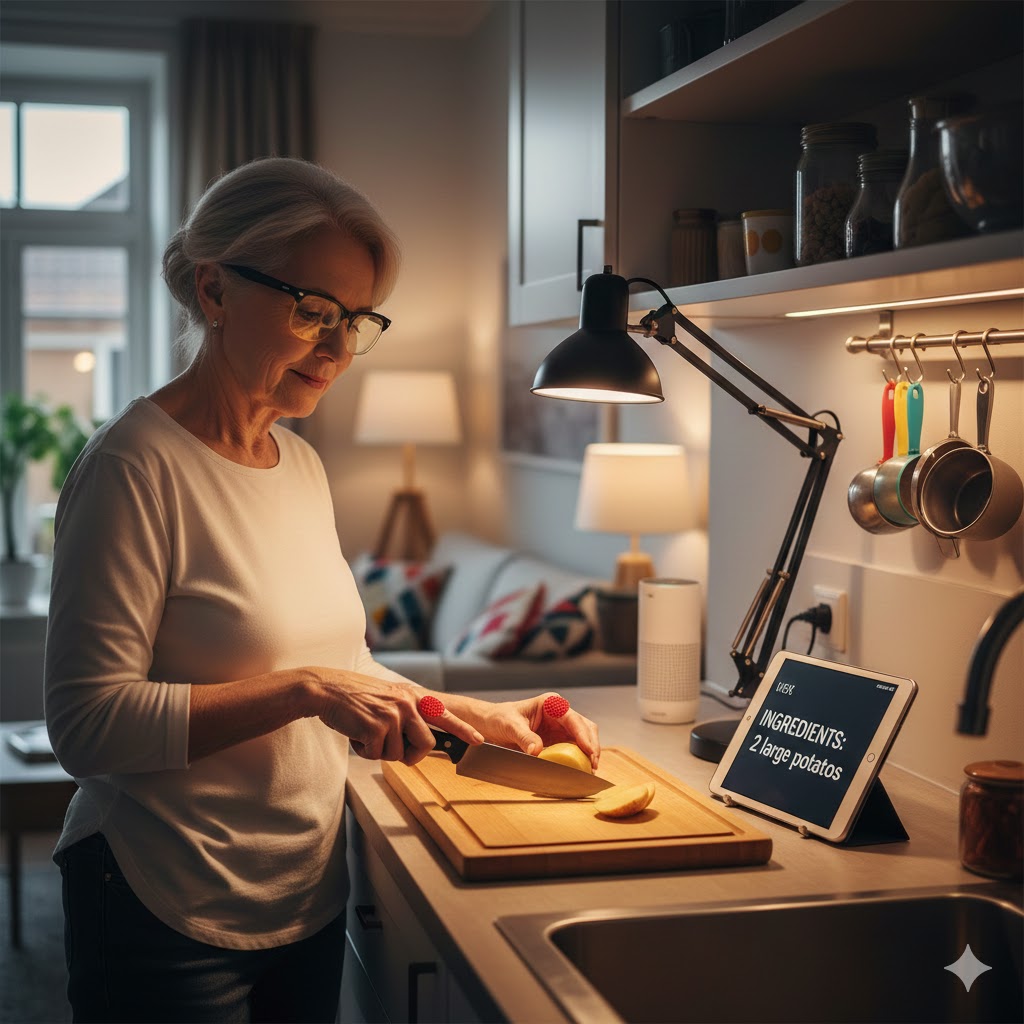
Receiving a macular degeneration diagnosis can feel overwhelming, but it doesn’t mean giving up the activities and independence you value. Thousands of people with age-related macular degeneration (AMD) continue reading, cooking, traveling, and enjoying hobbies—they’ve simply learned different ways to accomplish familiar tasks.
This guide shares practical hacks and hints gathered from low vision specialists, rehabilitation experts, and people living successfully with macular degeneration. These aren’t theoretical suggestions—they’re proven strategies that work in real kitchens, living rooms, and daily routines. Whether you’re newly diagnosed or looking for fresh ideas to improve your current situation, you’ll find actionable tips you can implement today.
According to the National Eye Institute, AMD affects nearly 20 million Americans and is a leading cause of vision loss in people over 50. Understanding your condition and learning adaptive strategies early makes a significant difference in maintaining quality of life.
Understanding Macular Degeneration and Your Vision
How AMD Affects Daily Activities
Macular degeneration damages the macula—the central part of your retina responsible for sharp, detailed vision. This means:
- Reading becomes difficult because the center of your visual field is blurry or distorted
- Recognizing faces requires getting closer or learning to use peripheral cues
- Fine detail work like threading needles or reading medication labels is challenging
- Driving may become restricted or unsafe depending on vision loss severity
However, your peripheral (side) vision typically remains intact. Many of the strategies below leverage this remaining vision effectively.
Research from PMC confirms that investigating difficulties during activities of daily living is fundamental for developing effective vision rehabilitation strategies. Understanding exactly how AMD affects your specific daily tasks helps target the most impactful adaptations.
The Importance of Early Adaptation
Starting adaptive strategies early—even when vision loss is mild—builds habits that serve you well if vision changes progress. People who learn techniques like eccentric viewing and lighting optimization during early-stage AMD report greater confidence and independence than those who wait until vision loss becomes severe.
Cleveland Clinic recommends that anyone with significant vision loss get a low-vision evaluation by a trained specialist who can test your vision and understand the specific ways your vision affects your life.
Lighting: Your Most Powerful Tool
Why Lighting Matters More Than You Think
By age 60, we need three times more light than in our twenties. If you add a sight loss condition like macular degeneration, that figure can double. A 60-year-old with AMD may need six times more light than a sighted 20-year-old to accomplish the same tasks.
Proper lighting is often the single most impactful change you can make. Our comprehensive guide on home lighting for vision impairment covers this topic in depth, but here are the essential strategies:
Task Lighting Essentials
Adjustable Arm Lamps
- Position light directly over reading material, crafts, or kitchen tasks
- Look for lamps with adjustable brightness settings
- LED bulbs provide bright, cool light without excessive heat
- Keep the light source between your eyes and the task, not behind you
Under-Cabinet Kitchen Lighting
- Install LED strips under upper cabinets
- Illuminates countertops where food preparation happens
- Reduces shadows that make cutting and measuring dangerous
- Motion-sensor options provide hands-free operation
Multiple Light Sources Per Room
- Avoid single overhead fixtures that create shadows
- Place lamps throughout the room for even illumination
- Eliminate dark corners that cause your eyes to constantly readjust
- Keep hallways lit to prevent adaptation delays between rooms
Managing Glare Without Sacrificing Brightness
Glare is as problematic as insufficient light. The Macular Society recommends these strategies:
- Vertical blinds over horizontal—easier to control light direction and reduce glare
- White or light-colored lampshades—maximize light output while diffusing harsh rays
- Clean windows regularly—maximize natural daylight without adding fixtures
- Remove net curtains—they reduce light transmission significantly
- Matte finishes on surfaces—glossy tables and counters reflect glare back into your eyes
Smart Lighting Solutions
Modern smart home technology makes lighting control accessible without vision:
- Voice-controlled bulbs: “Alexa, set kitchen lights to 100%”
- Motion sensors: Lights activate automatically when you enter a room
- Scheduled lighting: Automatic adjustment throughout the day
- Brightness presets: Save your ideal settings for different activities
Contrast: Making Everything Visible
The Power of Color Contrast
When central vision is compromised, contrast becomes your primary visual cue. High contrast between objects and backgrounds makes items dramatically easier to locate and use.
Kitchen Hacks
- Use dark cutting boards for light foods (onions, potatoes) and light boards for dark foods (peppers, meat)
- Place dark placemats under white dishes, white placemats under dark dishes
- Mark stove dials with bright nail polish or raised bump dots
- Use contrasting colors for measuring cups and spoons
- Pour light liquids into dark cups, dark liquids into light cups
Living Space Modifications
- Dark switch plates around light-colored walls (or vice versa)
- Bright tape on stair edges and step-downs
- Contrasting pillows or throws to identify seating
- Dark doorframes against light walls to locate room entrances
- Colored tape around remote control buttons
Personal Items
- Use bright or contrasting cases for phones, glasses, keys
- Apply bump dots or textured tape to frequently used buttons
- Choose high-contrast colors when purchasing new items
- Mark medications with different textured rubber bands
Organization as a Vision Strategy
Consistent organization reduces reliance on vision:
- Designated spots for everything—keys, wallet, phone always in the same place
- Labeled containers—large print, high contrast, or tactile labels
- Grouped items by function—all coffee supplies together, all medications in one spot
- Reduce clutter—fewer items means easier visual scanning
Eccentric Viewing: Using Your Peripheral Vision
What Is Eccentric Viewing?
Eccentric viewing is a technique where you learn to look slightly away from what you want to see, using a different part of your retina that isn’t damaged by macular degeneration. According to the Spectrios Institute for Low Vision, this strategy can significantly improve functional vision for many daily tasks.
When macular degeneration damages your central vision, you naturally develop a “preferred retinal locus” (PRL)—a spot on your peripheral retina that your brain learns to rely on. Eccentric viewing training helps you identify and consistently use your PRL.
The Clock Method for Finding Your Best Viewing Angle
One simple way to find your best eccentric viewing position:
- Imagine a clock face with what you want to see at the center
- Look at each “hour” position while keeping the object at center
- Notice which position makes the object clearest
- Practice consistently looking at that position when you want to see something clearly
For many people, looking slightly to the left or right of an object (9 o’clock or 3 o’clock position) works best, but your optimal position depends on your specific pattern of vision loss.
Training and Practice
The Macular Society offers eccentric viewing training that can be delivered over telephone or digitally by trained staff. Research published in Ophthalmology Science shows that while results vary, many people benefit from structured training, particularly those with more advanced vision loss.
Key points about eccentric viewing training:
- Requires dedication and practice—you’re retraining your brain to process visual information differently
- Results vary by individual—some people see dramatic improvement, others modest gains
- Professional guidance helps—consumer training services can accelerate learning and prevent frustration
- Combine with other strategies—eccentric viewing works best alongside good lighting and magnification
The Steady Eye Strategy
An alternative to eccentric viewing for reading is the “steady eye strategy”:
- Keep your eyes still in your best position
- Move the text through your field of vision
- Can be faster and more accurate for some people
- Takes longer to learn but may be worth the effort
Assistive Technology for Daily Living
Smartphone Apps: Free to Low Cost
Your smartphone is a powerful low vision tool. These apps can make daily tasks significantly easier:
Magnification Apps
- Built-in magnifier on iPhone and Android
- Adjustable zoom levels
- Flashlight integration for better lighting
- Freeze-frame feature for labels and signs
Text-to-Speech
- Seeing AI (free, iOS): Reads text, identifies products, describes scenes
- KNFB Reader: Professional-grade text recognition
- Voice Dream Reader: Reads documents and ebooks aloud
Voice Assistants
- Set timers and alarms without seeing the screen
- Create shopping lists by voice
- Get weather, news, and information hands-free
- Control smart home devices
Handheld Magnifiers
When smartphone magnification isn’t enough, handheld magnifiers offer higher magnification and easier handling:
- Illuminated models: Built-in LED lighting
- Different magnification powers: 2x to 20x depending on need
- Portable: Fit in purse or pocket for use anywhere
- Simple operation: No learning curve or charging required
Video Magnifiers (CCTVs)
For sustained reading and detailed tasks, desktop video magnifiers and portable CCTVs provide:
- High magnification: Up to 80x or more
- Adjustable contrast: Reverse black and white, change color combinations
- Large viewing area: See more text at once compared to optical magnifiers
- Comfortable positioning: Ergonomic design for extended use
- Writing capability: See your own handwriting in real-time
Wearable Low Vision Glasses
Low vision glasses and wearable devices offer hands-free magnification:
- Bioptic telescopes: Magnification mounted on regular glasses
- Electronic wearables: Cameras with adjustable zoom and contrast
- Specialized glasses: For distance viewing, near tasks, or specific activities
- Portable magnification: Use while moving or doing tasks that require both hands
Screen Reading Software
For computer and device access, screen reading software provides:
- Text-to-speech: Computer reads everything aloud
- Screen magnification: Enlarge portions of the screen
- High contrast modes: Reduce eye strain and improve visibility
- Keyboard navigation: Reduce dependence on mouse/cursor accuracy
Home Modifications That Make a Difference
Kitchen Safety and Efficiency
The kitchen presents both challenges and opportunities for adaptation:
Cooking Safely
- Use induction cooktops (no open flame, surface stays cool)
- Install automatic stove shut-offs
- Use timers for everything (voice-activated works well)
- Keep pot handles turned inward to prevent spills
- Use slotted spoons and strainers that rest on pot edges
Meal Preparation
- Pre-cut vegetables when lighting is optimal
- Use fixed-blade slicing guides for consistent cuts
- Mark measuring cups with bump dots for common measurements
- Choose appliances with tactile controls over touchscreens
- Use talking kitchen scales and measuring devices
Food Management
- Rubber band systems for identifying similar containers
- Large-print or talking labeling systems
- Consistent organization in refrigerator and pantry
- High-contrast storage containers
Bathroom Adaptations
Safety First
- Non-slip mats in tub and on floor
- Grab bars near toilet and in shower
- Bright nightlight for nighttime navigation
- Contrasting toilet seat color
Daily Tasks
- Organize toiletries in consistent positions
- Use pump bottles instead of twist caps
- Talking or large-display scales
- Magnifying mirrors with built-in lighting
- Tactile markers on medication bottles
Living Areas
Furniture Arrangement
- Clear pathways without obstacles
- Consistent furniture placement (don’t rearrange frequently)
- Contrasting furniture against flooring
- Remove or secure area rugs to prevent tripping
Technology Setup
- Voice-controlled TV and entertainment
- Large-button remotes with tactile markers
- Smart speakers for hands-free information and control
- Talking clocks and watches throughout the home
Reading Strategies and Solutions
Maximizing Remaining Vision for Reading
Reading often becomes the most frustrating challenge for people with macular degeneration. These strategies help:
Environmental Optimization
- Strong, direct lighting on reading material
- Reduce glare with matte book covers or reading stands
- Position material at optimal distance (determined by your vision)
- Take breaks to reduce eye fatigue
Format Adjustments
- Large print books (available free through libraries)
- E-readers with adjustable font size and contrast
- Audiobooks (free through library apps like Libby)
- Newspaper and magazine subscriptions in audio format
Reading Aids
- Line guides to track across pages
- Typoscopes (black cards with reading window)
- Reading stands to maintain optimal distance
- Video magnifiers for sustained reading sessions
Digital Reading Solutions
Digital formats offer advantages for people with vision loss:
- Adjustable everything: Font size, spacing, contrast, background color
- Text-to-speech: Let the device read to you
- Search functionality: Find information without scanning pages
- Portability: Carry thousands of books on one device
Maintaining Independence Outside the Home
Navigation and Mobility
General Strategies
- Travel familiar routes during optimal lighting conditions
- Use high-contrast sunglasses outdoors to reduce glare
- Carry a small flashlight for reading menus, labels, signs
- Download navigation apps with voice guidance
Public Spaces
- Sit near windows in restaurants for better lighting
- Request large-print menus or use phone magnifier
- Allow extra time for eyes to adjust when entering buildings
- Don’t hesitate to ask staff for assistance
Transportation
- Many areas offer paratransit services for people with vision loss
- Rideshare apps work entirely through voice and don’t require driving
- Public transit often has audio announcements
Social Connections
Vision loss doesn’t mean social isolation:
- Support groups: Connect with others facing similar challenges (NELVB resources can help you find local groups)
- Low vision programs: Libraries, senior centers, and community organizations often offer programs
- Video calling: Stay connected with family using devices with large screens
- Hobby groups: Many activities adapt well to low vision (gardening, music, certain crafts)
Professional Support: When and Why to Seek Help
Low Vision Evaluation
A comprehensive low vision evaluation differs from a standard eye exam:
- Functional assessment: How vision loss affects specific daily activities
- Remaining vision optimization: Maximizing what you can still see
- Assistive technology recommendations: Matching tools to your needs
- Training referrals: Learning to use adaptive techniques effectively
Medicare Part B covers low vision evaluations, and state programs often provide additional support. Our guide on making macular degeneration management affordable explains funding options in detail.
Working with Assistive Technology Specialists
Training services from certified specialists provide:
- Personalized instruction: Techniques matched to your vision and goals
- Equipment optimization: Getting the most from technology you own
- Problem-solving: Addressing specific challenges you’re facing
- Ongoing support: Adapting strategies as vision or needs change
Research shows technology abandonment rates reach 30-40% without proper training. Investing in professional instruction ensures you actually use—and benefit from—adaptive strategies and equipment.
State and Federal Resources
State Commissions for the Blind
All 50 states provide services to people with visual impairment:
- Connecticut resources
- Maine resources
- Massachusetts resources
- New Hampshire resources
- Rhode Island resources
- Vermont resources
Veterans Services
Veterans with vision loss have access to comprehensive VA benefits including equipment, training, and rehabilitation services.
Comparison: Daily Living Strategies by Vision Stage
| Vision Stage | Priority Strategies | Technology Needs | Professional Support |
| Early (Mild) | Lighting optimization, organization systems, smartphone apps | Built-in phone features, task lighting, basic magnifiers | Low vision evaluation, learn eccentric viewing basics |
| Moderate | Contrast enhancement, eccentric viewing practice, multiple magnification options | Handheld magnifiers, tablet magnification, audiobooks | 2-4 training sessions, home modification assessment |
| Advanced | Comprehensive home modifications, reliance on audio/tactile information, professional equipment | Desktop video magnifiers, screen readers, smart home integration | Ongoing training relationship, occupational therapy |
Glossary
| Term | Definition |
| Age-Related Macular Degeneration (AMD) | Progressive eye condition affecting the macula, causing central vision loss while typically preserving peripheral vision |
| Eccentric Viewing | Technique of looking slightly away from an object to use undamaged peripheral retina instead of damaged central macula |
| Preferred Retinal Locus (PRL) | The specific area of peripheral retina that the brain learns to use for detailed vision tasks when the macula is damaged |
| Video Magnifier/CCTV | Electronic device using camera and screen to magnify reading material with adjustable contrast and magnification |
| Contrast Sensitivity | Ability to distinguish between objects and backgrounds of similar brightness—often reduced in macular degeneration |
| Task Lighting | Directed lighting positioned specifically for detailed activities like reading, cooking, or crafts |
| Low Vision Evaluation | Comprehensive assessment by a specialist to determine functional vision capabilities and recommend adaptive strategies |
| Assistive Technology | Devices, software, and equipment that help people with visual impairment perform daily tasks independently |
| Screen Reader | Software that converts on-screen text to speech, enabling people with vision loss to use computers and mobile devices |
| Steady Eye Strategy | Reading technique where eyes remain still while text is moved through the field of vision |
Troubleshooting Common Challenges
| Challenge | Solutions | When to Seek Help |
| Can’t find the right lighting level | Try different bulb temperatures (warm vs. cool), experiment with light positioning, consider dimmable fixtures | If optimal lighting isn’t clear after experimentation, schedule consultation for professional assessment |
| Eccentric viewing isn’t working | Ensure you’ve identified the correct position (try all clock positions), practice consistently for several weeks, combine with proper lighting | If no improvement after 4-6 weeks of daily practice, professional training can identify issues |
| Technology feels overwhelming | Start with one device/feature at a time, ask for demonstrations before purchasing, consider remote training | If frustration persists, training sessions prevent abandonment of helpful tools |
| Family doesn’t understand limitations | Share educational resources, invite them to appointments, explain that AMD affects central vision while peripheral remains | Support groups help both patients and families adjust |
| Vision seems worse despite strategies | Changes may indicate progression—schedule ophthalmologist appointment, reassess current strategies | Any sudden vision changes warrant immediate medical attention |
| Purchased equipment doesn’t help | Review whether device matches your actual needs, ensure proper training on use, check if settings are optimized | Consultation can identify better-matched solutions |
Frequently Asked Questions
Q: What’s the single most important change I can make to live better with macular degeneration?
A: Improving your lighting typically has the biggest impact for the least cost and effort. Start by adding bright, adjustable task lighting where you read, cook, and do detailed work. Many people are amazed at how much better they can see with proper illumination—it’s often the equivalent of one or two lines on an eye chart.
Q: How long does it take to learn eccentric viewing?
A: Most people notice some improvement within 2-4 weeks of consistent practice, but becoming proficient typically takes 2-3 months. The Macular Society notes that dedication and concentration are required—you’re essentially retraining your brain to process visual information differently. Professional training can accelerate this process.
Q: Should I buy expensive assistive technology right away?
A: No. Start with low-cost solutions (smartphone apps, better lighting, organization systems) and see what specific challenges remain. Then address those challenges with appropriate technology. A low vision evaluation helps prevent expensive trial-and-error by matching technology to your actual functional needs.
Q: Can I still drive with macular degeneration?
A: It depends on your specific vision measurements and state laws. Some people with early or moderate AMD continue driving legally and safely, while others need to stop. An honest assessment of your visual function—not just acuity measurements—is essential. Your ophthalmologist and low vision specialist can help you understand your situation.
Q: Will these strategies prevent my macular degeneration from getting worse?
A: Adaptive strategies don’t change the underlying disease progression, but research from the National Eye Institute shows that AREDS2 supplements may slow progression in some people. Lifestyle factors like not smoking, maintaining healthy blood pressure, and eating a nutritious diet also support eye health. The strategies in this guide help you function better with whatever vision you have.
Q: How do I know when I need professional help versus figuring things out myself?
A: Seek professional help if: you’re struggling with essential daily activities despite trying basic adaptations, you’ve purchased equipment you don’t know how to use, you feel isolated or depressed about your vision loss, or your vision has changed significantly. Training services exist specifically to help you skip the frustrating trial-and-error phase.
Key Takeaways
- Lighting is your most powerful tool—by age 60 with AMD, you may need six times more light than a sighted 20-year-old; invest in task lighting and eliminate glare
- Contrast makes everything visible—use color differences between objects and backgrounds for easier identification of switches, stairs, food, and daily items
- Eccentric viewing leverages your remaining vision—learning to look slightly away from objects can significantly improve functional vision for reading and detailed tasks
- Start with low-cost solutions—smartphone apps, organization systems, and lighting improvements cost little but make substantial differences before investing in expensive equipment
- Professional training prevents frustration—assistive technology specialists help you skip months of trial-and-error and avoid abandoning helpful strategies
“Living well with macular degeneration isn’t about finding a single solution—it’s about building a toolkit of strategies that work together. Good lighting makes your magnifier more effective. Organization reduces how much you need to see. Training ensures you actually use the tools available. Each hack and hint adds to your independence.”
— Scott Krug, President, New England Low Vision and Blindness
Take the Next Step Toward Independence
New England Low Vision and Blindness helps you move from overwhelmed to optimistic. Our Assistive Technology Specialists provide personalized evaluation, hands-on training, and ongoing support tailored to your specific vision and lifestyle goals.
Ready to explore your options?
- Download our free Macular Degeneration Low Vision Guide with practical action items for daily living
- Call 888-211-6933 to schedule a consultation and discuss which strategies might help most
- Visit our showroom to try assistive technology hands-on before making decisions
- Explore our Low Vision Products to see what’s possible at every budget level
- Learn about training services that help you use adaptive strategies effectively
You don’t have to figure this out alone. Bringing hope through technology, training, and care is what we do.