How to Use Assistive Technology in the Classroom for Enhanced Student Learning
How to Use Assistive Technology in the Classroom
Assistive technology opens new pathways for students with visual impairments, giving them the tools they need to participate fully in classroom activities and reach their academic potential. From screen readers and Braille displays to magnifiers and speech-to-text software, these devices create an accessible and engaging learning environment for everyone.
At New England Low Vision and Blindness, we help teachers find, implement, and use leading-edge solutions that make a difference every day. Teachers of the visually impaired can use assistive technology to support independence, improve access to learning materials, and empower students to succeed in mainstream classrooms.
Understanding Assistive Technology in the Classroom
Assistive technology supports students with visual impairments by giving them the tools and resources to fully participate in learning. Using these technologies allows us to create accessible, inclusive classrooms where every student has a chance to succeed.
Definition and Purpose
Assistive technology in the classroom means devices, software, or systems designed to help students overcome barriers linked to visual impairments. These tools can range from simple tactile rulers to advanced electronic magnifiers or screen readers.
The main purpose of assistive technology is to provide equal access to learning materials and school activities. By offering the right technology, we help students with low vision or blindness read, write, and join discussions just like their peers.
At New England Low Vision and Blindness, we focus on providing leading-edge solutions that match students’ unique needs. Our goal is to empower students so they can engage with their lessons and develop independent learning skills.
History and Legal Framework
Assistive technology has seen major growth since the 1970s, when important laws like Section 504 of the Rehabilitation Act started recognizing the rights of students with disabilities. In 1990, the Individuals with Disabilities Education Act (IDEA) was passed. IDEA requires schools to provide free and appropriate education, including assistive technology if needed.
These laws and policies make sure that students can receive assistive devices and services as part of their Individualized Education Program (IEP). Today, federal and state rules continue to protect students’ right to accessible learning by supporting technology in special education settings.
This legal framework has shaped the way we deliver support, ensuring that assistive technology is part of everyday learning for students with visual impairments.
Types of Assistive Technology
Assistive technology for students with vision loss covers a wide range of tools. Examples include:
- Screen readers: Software that reads digital text aloud, helping students access computers and online materials.
- Electronic magnifiers: Devices that enlarge text and images for easier viewing.
- Braille displays and embossers: Equipment that translates text into tactile Braille for students who read Braille.
- Audio books and text-to-speech tools: Programs that convert written materials into spoken words.
We often recommend a mix of these tools depending on each student’s needs. By integrating various technologies, we can help students participate in classroom tasks, access the curriculum, and achieve their academic goals.
Identifying Students Who Benefit from Assistive Technology
Assistive technology can make the classroom more accessible for many students. Knowing which students will benefit most is essential for improving learning outcomes and engagement every day.
Students with Disabilities
Students with disabilities—including those who are blind, visually impaired, hard of hearing, or have physical or communication challenges—often need specialized tools. Examples include screen readers, Braille displays, and magnification software for students with low vision.
For students who have trouble hearing, amplification systems, captioning services, or personal FM systems can make instruction much clearer.
Some students may require tools that support communication, such as speech-generating devices or symbol-based communication boards.
Teachers, families, and support staff should work together, using assessments and observations, to identify which devices or software each student needs. These supports are vital for students to take part in general and extracurricular activities, not just academics.
Students with Learning Disabilities
Students diagnosed with learning disabilities, such as dyslexia or ADHD, can face daily struggles in reading, writing, or organizing their thoughts. Assistive technology—like text-to-speech programs, audiobooks, and graphic organizers—helps these students process information at their own pace.
For a student with dyslexia, a simple text-to-speech tool can help them follow along with reading assignments. Spell checkers and word prediction software offer needed support in written assignments.
Visual schedules and timers help students with ADHD focus and manage transitions. Teachers should review each student’s Individualized Education Program (IEP) or 504 plan to learn more about which assistive tools are most beneficial.
General Education Classrooms
General education classrooms include a mix of students, and assistive technology benefits more than just those with documented disabilities. Features like closed captioning, screen magnification, and audio instructions can make lessons accessible to everyone.
Interactive whiteboards, touch-screen devices, and digital note-taking tools allow students with various learning styles and strengths to engage fully. These technologies reduce barriers not only for those with challenges like low vision or difficulty focusing but also for students who may not have a formal diagnosis.
By using a universal design approach, we ensure all students have equal access to the curriculum. Teachers play a key role in noticing needs as they arise and introducing technology solutions to support participation, focus, and achievement.
Key Assistive Technology Tools and Devices
There are many assistive technology tools available that support the unique needs of students who are visually impaired or have learning disabilities. These devices are designed to make reading, writing, and classroom participation accessible for everyone.
Text-to-Speech Solutions
Text-to-speech (TTS) technology reads digital text aloud, letting students access print materials in an audio format. This is especially helpful for those with low vision, blindness, or reading disabilities. TTS tools can be used with computers, tablets, and smartphones.
Many programs allow users to change the speed, voice, and highlighting options to fit individual preferences. Students can listen to textbooks, class notes, and web content. Some devices also support optical character recognition (OCR), so printed materials can be scanned and converted into speech.
TTS is useful for staying engaged with text even when fatigue or eye strain is an issue. By hearing the material read aloud, students often improve both comprehension and retention.
Speech-to-Text and Speech Recognition Software
Speech-to-text software converts spoken words into digital text. This is also called speech recognition. These tools support students who have trouble typing, writing, or using standard keyboards because of vision or motor challenges.
With speech recognition, students can dictate essays, complete assignments, and even send emails using only their voice. Many of these programs have built-in word prediction and error correction features, which make writing clearer and faster.
Speech-to-text is often built into operating systems and can be found on many tablets and smartphones. This accessibility helps students work independently and reduces barriers to classroom participation.
Alternative Keyboards and Input Devices
Alternative keyboards and input devices make typing and navigation possible for users who cannot use a standard keyboard or mouse. There are many types, including large-print keyboards, braille keyboards, and keyboards with color-coded keys. These devices help those with visual impairments or limited hand function.
Key features of alternative keyboards:
| Device | Main Benefit | Who It Helps |
| Large-print keyboards | Easier to see keys | Low vision, older users |
| Braille keyboards | Non-visual input | Braille-literate students |
| Ergonomic keyboards | Reduce strain | Limited hand/motor skills |
| One-handed keyboards | Use with single hand | Users with one-hand mobility |
Switches, trackballs, and other adaptive devices also allow for custom access, so each student’s needs can be met.
Graphic Organizers and Writing Support
Graphic organizers are visual tools that help students structure their thoughts when planning written work. These tools include digital mind maps, outlines, flow charts, and webs. Many programs are screen reader-friendly, making them accessible to students who are blind or have low vision.
Digital organizers help with breaking down writing assignments into clear steps. This is vital for students with dysgraphia or other learning disabilities. Writing support software often pairs this with word prediction, spell checkers, and grammar tools. Some programs highlight sentences and provide audio feedback.
These resources give students a clearer way to organize ideas, draft essays, and complete reports, leading to more confidence and success with writing tasks.
Assistive Technology for Diverse Needs
When supporting students with different abilities, it is important that we provide personalized tools for hearing, mobility, and vision. Selecting the right technology can help students access information, engage with lessons, and participate more fully in learning.
Hearing Support: FM Systems
FM systems are reliable tools that help students who are hard of hearing hear more clearly in classrooms. The teacher wears a small microphone, which sends their voice directly to the student wearing a receiver. This reduces background noise and improves sound quality.
Some FM systems are paired with hearing aids or cochlear implants. Volume can be adjusted for comfort, and the device is small and portable for easy classroom use. FM technology works for individual, group, and whole-class settings.
Teachers need basic training to use FM systems effectively. Troubleshooting tips include checking batteries and making sure microphones are not covered.
Key benefits:
- Clearer speech understanding
- Less classroom distraction
- Better focus on lessons
Mobility and Physical Access Tools
Students with physical limitations can benefit from a variety of assistive options. Sip-and-puff systems allow students to control computers and devices by inhaling or exhaling. These are important for students who have limited use of their hands.
Touch-screen tablets and interactive displays can replace traditional keyboards, making access easier. Schools can also provide alternative input devices, such as large keyboards, one-handed keyboards, or adaptive mice.
We recommend creating a seating plan that offers a range of options. This helps ensure students have space for their assistive devices. Teachers should collaborate with occupational therapists to meet unique student needs.
Examples:
- Sip-and-puff controllers
- Switch-based input devices
- Adjustable tables
- Touch-screen monitors
Visual Aids and Adaptations
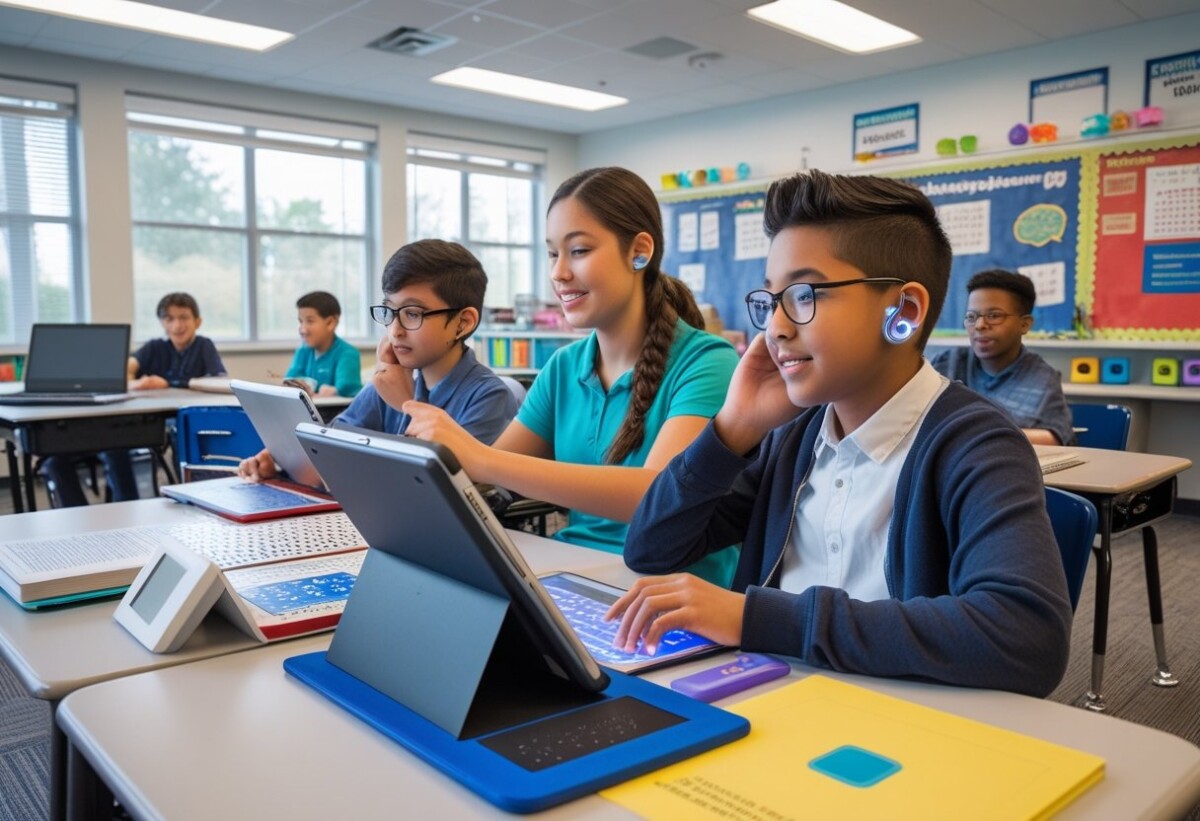
Students with visual impairment need access to leading-edge technology to join classroom activities fully. Video magnifiers, screen readers, and Braille displays are all essential. Some students benefit from using immersive VR experience platforms for learning and exploration.
For texts and images, providing high-contrast materials, large print, and tactile graphics makes a difference. Digital textbooks with built-in screen-reading features can be customized to meet individual preferences.
We offer vision assessments and training to help students and teachers get the most from these tools. Regular updates of software and hardware keep devices reliable and user-friendly.
Recommended solutions:
- Screen readers (such as JAWS or NVDA)
- Braille note-takers
- Video magnifiers
- Large print and tactile graphics
- Virtual reality tools for inclusive learning
Integrating Assistive Technology into Teaching Practices
By using assistive technology, we help students with visual impairments learn more effectively. These tools let us adapt lessons, work more closely with special education teams, and build the right support for teachers and students with learning disorders.
Adapting Instructional Methods
To reach every learner, we adjust our teaching with assistive tools. For students with low vision or blindness, screen readers, braille displays, and magnification software can make digital content accessible. Using audio instructions or tactile graphics also supports different learning preferences.
Lists and graphic organizers can break complex ideas into smaller parts. This helps not only those with visual challenges but also students with learning disorders. We use leading-edge technology to create custom resources—like large print handouts or talking calculators—to match each student’s needs.
By frequently checking in and gathering feedback, we can change our approach when needed. Adjusting classroom layouts or using flexible seating gives students better access to technology.
Collaboration with Special Education Programs
Working together with special education teams ensures that students with learning disorders and visual impairments have the right tools. We meet regularly to discuss each student’s needs and update their Individualized Education Plans (IEPs) or 504 plans.
Special education staff offer valuable insights. They can recommend which assistive devices are best, such as refreshable braille displays or software for note-taking. We work with them to review student progress and make technology adjustments as students grow or as challenges change.
Families and specialists are invited to join conversations. Involving everyone makes sure resources are used effectively and everyone understands their role in supporting each student.
Training and Support for Educators
Providing strong training and support to teachers makes assistive technology more successful. We schedule workshops on using devices like screen magnifiers, accessible tablets, and text-to-speech tools. These sessions include hands-on practice so teachers feel confident.
A table can help organize available technologies:
| Tool Name | Use Case | Student Need |
| Screen Reader | Reading digital text aloud | Blind/Low Vision |
| Magnification Software | Enlarging on-screen content | Low Vision |
| Braille Display | Outputting text in braille | Totally Blind |
| Audio Books | Listening to textbooks | Reading Difficulties |
| Speech-to-Text | Writing help | Dyslexia/Blindness |
Challenges and Best Practices in Implementation of Assistive Technology in the Classroom
Effective use of assistive technology in the classroom for students with visual impairments takes thoughtful planning, teamwork, and ongoing support. Key concerns include equal access, practical obstacles like funding and training, and making sure our tools actually help students reach their goals.
Ensuring Accessibility and Inclusion
To create a successful learning environment, we need to guarantee that every student has access to the right assistive technology.
It is important to consider both digital and physical accessibility. This means ensuring screen readers, magnifiers, and braille displays are compatible with instructional materials. Whenever possible, we select devices and software that can be personalized to match each student’s unique needs.
We also focus on involving all members of a student’s support team, including teachers, parents, and specialists. Staff must be trained to use leading-edge tools and understand how to make class content accessible. A supportive atmosphere—where students feel included and empowered to use technology—remains essential.
Overcoming Common Barriers
Some persistent challenges include costs, lack of resources, and limited training. Budget limitations can affect which devices we choose or how widely we can deploy them. Our approach is to prioritize the most impactful tools and seek funding options, such as grants available for assistive technology in education.
Teacher readiness varies. We support teachers with targeted training, regular workshops, and helpful guides. We also address technical issues, so students are not disrupted by device malfunctions or software problems.
Other common concerns include keeping up with rapidly changing technology and making sure every student can use the devices confidently. Planning ahead, regular team check-ins, and having clear protocols help us manage these challenges.
Evaluating Effectiveness
We constantly monitor how well assistive technology supports student learning outcomes.
Our evaluation process uses clear metrics, such as:
- Improved reading speed or comprehension
- Increased engagement in class activities
- Student independence in accessing materials
Feedback from students, teachers, and families is collected through surveys or regular meetings. We adjust our strategies based on this input. When possible, we compare student performance before and after new assistive technology is introduced.
We also stay informed about new research and best practices. This means our supports remain up-to-date and tailored for success in each classroom setting.
Frequently Asked Questions About How to Use Assistive Technology in the Classroom
We know teachers want practical ways to make lessons accessible for all students. Finding the right assistive technology, using it well, and making sure everyone benefits is key to supporting students with visual impairments and other disabilities.
What are effective methods for implementing assistive technology for students with disabilities?
We recommend starting with an individual assessment to match the student’s needs with the right device or software. Training for both staff and students ensures everyone understands how to use the technology effectively.
Regularly checking in and making adjustments helps keep tools up-to-date as students’ needs change. Open communication with families, specialists, and teachers also increases successful use.
Can you provide some examples of how teachers have successfully used assistive technology in the classroom?
Screen readers like JAWS and refreshable braille displays allow students who are blind to access digital textbooks and assignments. Teachers have also used magnification devices to help students with low vision read printed materials and whiteboards.
Graphic organizer software, digital recorders, and adapted keyboards make classroom work easier for students with reading, writing, or organizational challenges.
What benefits does assistive technology bring to the educational process?
Assistive technology opens access to learning and helps students work more independently. It also gives students more ways to participate in class and show what they know.
By providing different tools, we create a more supportive environment that encourages all students to learn and grow.
How can assistive technology be integrated into lesson plans across various subjects?
Including screen magnifiers or digital text in reading assignments can help students follow along in English class. In math, tactile graphing tools and accessible calculators allow everyone to fully participate.
We often suggest using audio-supported materials in history or science lessons. Collaborating with educational specialists during lesson planning ensures the best tools are included for each subject.
What are the common types of assistive technology devices used in classroom settings?
Devices commonly include digital magnifiers, screen readers, and braille note-takers. Audio books and accessible tablets or laptops are also widely used.
For writing, adapted keyboards, voice recognition software, and portable scanning devices make reading and writing more accessible to students with visual impairments.
In what ways does assistive technology support inclusive education?
Assistive technology breaks down barriers by making learning materials accessible to everyone in the classroom. Students with visual impairments can work side by side with peers on the same assignments.
This ensures they are active members of the learning community, promoting inclusion and equal opportunities for all.
Download this content as a PDF
https://nelowvision.com/wp-content/uploads/2025/07/How-to-Use-Assistive-Technology-in-the-Classroom-for-Enhanced-Student-Learning.pdf
Empower Your Classroom with Inclusive Strategies
Are you ready to transform your classroom for students with low vision?
Explore practical training, proven adaptations, and the latest assistive technologies to ensure every student thrives. Whether you’re an educator, school administrator, or support professional, our tailored Education & Training Services equip you with the tools and confidence to create a truly inclusive learning environment.
Learn more and schedule your customized training today: nelowvision.com/training-services/education-training-services/