
BrailleNote Evolve QWERTY 40 Braille Notetaker 16GB

Type the way you already know and read every word in braille with the BrailleNote Evolve QWERTY 40 Braille Notetaker 16GB. A familiar laptop-style keyboard, Windows 11 Pro, and a built-in 40-cell braille display come together in one portable device. Create documents, manage email, browse the web, and work in Microsoft 365 with direct braille access. The 16GB model offers a lower entry price for everyday learning and productivity.

Pre-order by December 31 and save $500 on the 32 GB or $250 on the 16 GB

$6,699.00

-

View Brochure
Description

Type in QWERTY, Read in Braille, and Work in Windows With the BrailleNote Evolve QWERTY 40 Braille Notetaker 16GB

For many college students and professionals who are blind or have low vision, the keyboard is second nature. You type quickly, you know your screen reader, and you are ready to work. What is often missing is a reliable way to read your own words with precision, check formatting, catch a typo in a name, or review a contract line by line. Speech alone can only take you so far, and carrying a laptop, a separate braille display, and a phone to every class or meeting gets old fast.

Meet the BrailleNote Evolve QWERTY 40 Braille Notetaker 16GB

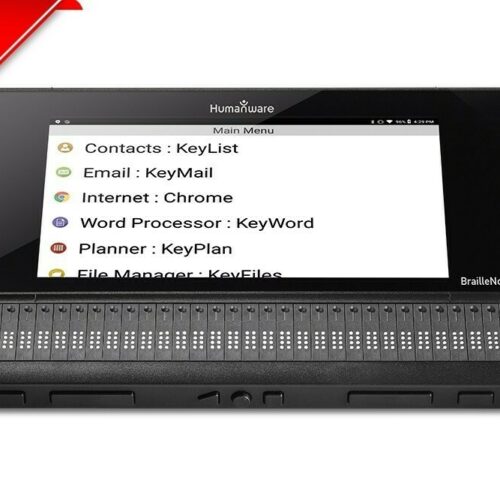
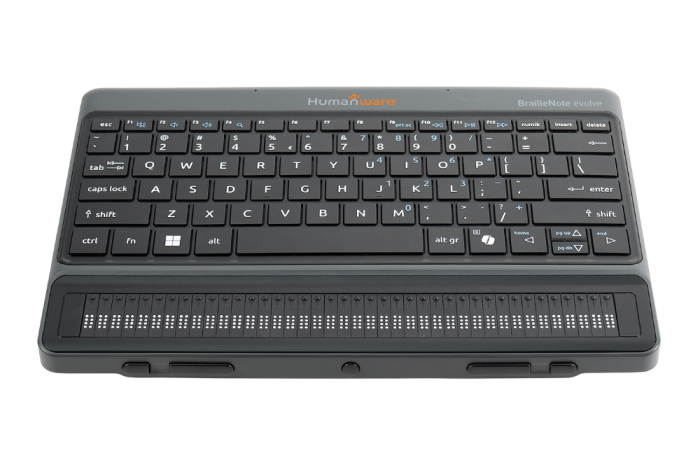
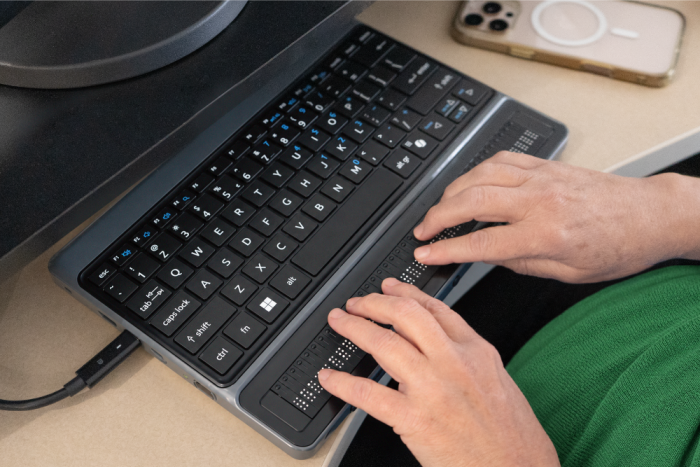
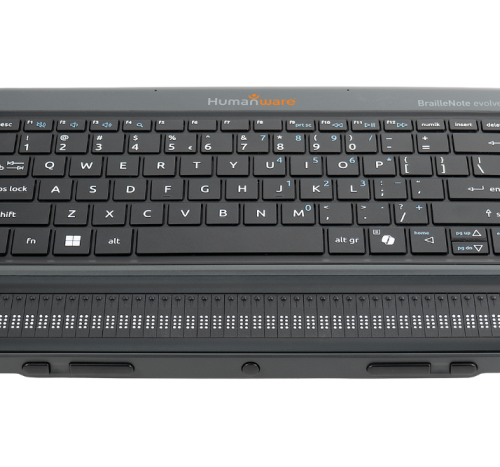
The BrailleNote Evolve QWERTY 40 Braille Notetaker 16GB puts a familiar laptop-style keyboard, Windows 11 Pro, and a built-in 40-cell braille display into one portable device. You type on the keyboard you know, read in braille, and work in Windows. Cursor routing keys take you straight to the text you want to edit.

Work Your Way With the BrailleNote Evolve QWERTY

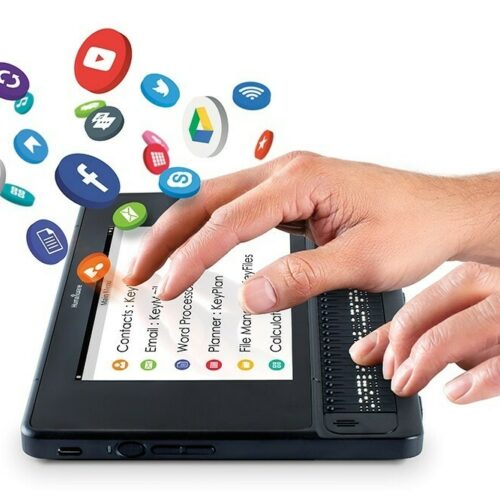
Start in KeySoft, a braille-first interface, or open your Windows applications with NVDA or JAWS. Six months of JAWS are included. Create documents, manage email, browse the web, and work in Microsoft 365 with direct braille access, using the same tools as your classmates and colleagues. From your first email of the day to your final edits, braille stays at your fingertips.

Everyday Performance at a Lower Entry Price

The 16GB model offers a lower entry price while delivering the same essential experience as the 32GB version. With 16GB of RAM for everyday learning and productivity, an Intel Core Ultra 5 processor, and 512GB of storage, it handles note-taking, writing, research, and email with ease. A battery rated for approximately five hours of continuous use carries you through a full class schedule or a long stretch of meetings. One device holds everything you need, so you can focus on your studies, your career, and your independence.

Who Can Benefit?

The BrailleNote Evolve QWERTY 40 Braille Notetaker 16GB is designed for people who are blind or have low vision and are comfortable using a QWERTY keyboard and a screen reader. It adds the precision of braille reading to the typing skills they already have, supporting school, work, and everyday tasks.

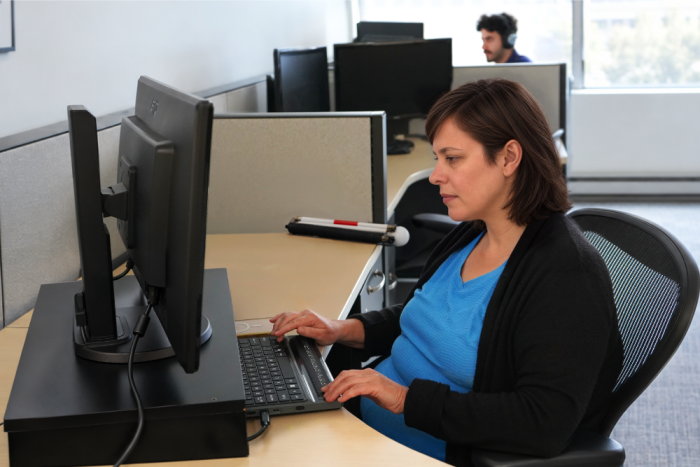
  • College and Graduate Students: Take lecture notes, write papers, and work through coursework in KeyMath, then review every line in braille before submitting. Microsoft 365 with direct braille access means working in the same files as classmates and professors.
  • Professionals: Draft reports, manage email, and review documents in braille without switching devices. HDMI and USB-C video out make it easy to share your screen in meetings.
  • Veterans: Veterans who type comfortably and use a screen reader can add braille reading to their daily routine. It is a practical way to handle correspondence, records, and work tasks independently.
  • Seniors: Adults who lost vision later in life and already use a keyboard and screen reader will find the QWERTY layout instantly familiar. Braille output adds accuracy when reading letters, documents, and personal records.
  • Job Seekers and Career Changers: Build Windows, screen reader, and Microsoft 365 skills on a device that matches the tools employers use. Polished, carefully proofread application materials are easier to produce when you can read them in braille.
  • Budget-Conscious Buyers: The 16GB model offers a lower entry price without giving up the keyboard, braille display, Windows 11 Pro, or KeySoft. It is a strong fit for anyone whose daily work centers on writing, email, research, and browsing.

How Will BrailleNote Evolve QWERTYChange Your Life?

The BrailleNote Evolve QWERTY 40 Braille Notetaker 16GB lets you carry less and accomplish more. Type a paper or a proposal on the QWERTY keyboard, then review it line by line on the braille display before you submit it. Move between KeySoft and Windows whenever you like, using NVDA or JAWS. Open KeyMath for coursework, read a book in Victor Reader, or use Braille Terminal to connect to your phone or computer and work as a braille display. Microsoft 365 apps run with direct braille access, so you can collaborate on the same files as classmates and coworkers. Wi-Fi 6 and Bluetooth keep you connected, and HDMI and USB-C video out let you share your screen with a professor or colleague. The result is simple: less waiting for help, and more doing it yourself, with confidence and dignity.

What the Experts Say

“So many of the students and professionals we work with are already fast typists and confident screen reader users. What they tell me they are missing is braille, the ability to truly read their own work. The BrailleNote Evolve QWERTY 40 Braille Notetaker 16GB gives them exactly that, without asking them to change how they work. They keep their keyboard, their workflow, and their Microsoft 365 tools, and braille is simply there when they need it. The 16GB model also puts that experience within reach at a lower price. I recommend it because I have seen the confidence that comes from proofreading your own paper or contract, line by line, without asking anyone for help.” — Scott Krug, President, New England Low Vision and Blindness

Experience the BrailleNote Evolve QWERTY 40 Braille Notetaker 16GB Today

Your words, your work, and your independence deserve a tool built around you. Reach out to New England Low Vision and Blindness to learn more about the BrailleNote Evolve QWERTY 40 Braille Notetaker 16GB, ask questions, and decide whether the 16GB or 32GB model is the right fit for your goals and budget. Our team is committed to helping every person find the right low vision and blindness solution. We take the time to understand how you study, work, and live, then guide you from your first conversation through setup and training. Contact us today and take the next step toward greater independence.

Helpful Resources

Features

Familiar Laptop-Style QWERTY Keyboard

Type at the speed you already know, with no need to learn braille input. Your keyboard and your workflow stay exactly as they are.

Built-In 40-Cell Braille Display

Read every word in braille, with cursor routing keys that take you straight to the text you want to edit.

Your Choice of KeySoft, NVDA, or JAWS

Work in KeySoft’s braille-first environment, or open your Windows applications with NVDA or JAWS. Six months of JAWS are included.

Windows 11 Pro, Fully Licensed

Access the Microsoft Store and other Windows applications on a full professional operating system.

Microsoft 365 With Direct Braille Access

Create documents, manage email, and work in Word, Outlook, Excel, and PowerPoint with KeySoft add-ins. A Microsoft 365 subscription is required.

KeyMath, Victor Reader, and Braille Terminal

Solve math, read books and online libraries, and connect to a phone or computer to use the device as a braille display.

HumanWare Thumb Keys and Action Button

Navigate comfortably with HumanWare’s signature thumb keys, and record voice notes or dictate with a dedicated action button.

Specifications

General specifications

  • Available in Qwerty/ QWERTZ / AZERTY
  • 40 Cells with cursor routing keys
  • Includes Windows 11 Pro fully licensed
  • Customized NVDA Powered by KeySoft user interface
  • FREE 6 months JAWS available with subscription optional through HumanWare
  • Battery autonomy: 5 hours performance continuous use

Material specifications

  • Processor : Intel Core Ultra 5 (10-cores processor)
  • 16GB or 32GB RAM (LPDDR5x)
  • 512GB Internal storage
  • Stereo Speakers
  • Stereo Microphones
  • X2 Bluetooth V5
  • Programmable Near field Communication (NFC)
  • Vibration Motor
  • Wi-Fi 6 (802.11a/b/g/n/ac/ax)

Applications

  • KeySoft Core applications include:
    Braille Editor : KeyBRF
  • Braille Terminal
  • File Manager : KeyFiles
  • KeySoft Control Center
  • Math Editor: KeyMath
  • Victor Reader
  • Optional JAWS For BrailleNote (6 months free trial and subscription available from HumanWare)
  • Office 365 (Subscription required)
  • KeySoft Add-ins available with Word, Outlook, Excel and PowerPoint
  • Microsoft Store
  • Other windows applications are available on install

Dimensions and Weight

  • Width: 295mm (11.61 in)
  • Depth: 202.5 mm (6.97 in)
  • Thickness: 21mm (1.09 in)
  • Weight: 1300g (2.87 lbs)

Ports and Buttons

  • HumanWare signature Thumb keys
  • KeySoft Home Button
  • 2 USB-C Thunderbolt ports (Charging and Video out)
  • USB-A 3.2
  • Kensington Lock
  • HDMI
  • 3.5MM Jack
  • Volume up and down
  • Action button (Voice recording / Dictate)

Reviews

“I have used a screen reader for years, but reading my thesis drafts in braille caught mistakes I never heard.” — Elena, Graduate Student

“I type fast and I know JAWS. This just added braille to the way I already work, and I stopped carrying two devices.” — Daniel, Financial Analyst

“Having Windows and a braille display in one machine means I walk into class with one bag and everything I need.” — Jordan, College Junior

“After my injury I relearned the computer with a screen reader. Now I can read my own reports in braille, and that independence matters to me.” — Marcus, U.S. Army Veteran

“I proofread contracts all day. Braille lets me check every name and number with confidence before anything goes out.” — Renee, Paralegal

“I lost my sight in my sixties but never stopped typing. Reading my letters back in braille feels like getting a piece of myself back.” — Margaret, Retired Teacher

What's in the box?

  • BrailleNote Evolve QWERTY
  • Carrying case
  • Two-part power supply
  • Command summary in braille
  • Getting started guide in braille
  • 6-month JAWS trial (optional)

Frequently Asked Questions

The 16GB refers to the device’s RAM. The 16GB model has a lower entry price and is built for everyday learning and productivity. The 32GB model adds extra memory for more demanding multitasking. Both deliver the same core experience: a QWERTY keyboard, a 40-cell braille display, Windows 11 Pro, KeySoft, and 512GB of storage.
It is designed for students in higher education and professionals who are comfortable using a QWERTY keyboard and a screen reader. If you are just beginning to learn braille, our team can help you compare it with other BrailleNote models.
The device includes a one-year warranty from HumanWare.
Yes. Using the Braille Terminal application, it can connect to another computer or smartphone and work as a braille display.
HumanWare rates the battery at approximately five hours of continuous use. Actual battery life may vary depending on how you use the device.
At New England Low Vision and Blindness, we provide personalized training to ensure you get the most out of your BrailleNote Evolve QWERTY 40 Braille Notetaker 16GB.
New England Low Vision and Blindness offers financing options to make this technology more accessible. Please visit our Financing page for solutions: https://nelowvision.com/financial-support-for-assistive-technology/.

What Our Customers Say

Hear from people whose lives have been transformed by New England Low Vision and Blindness.

stars

"Thank you so much for all your efforts and pics in providing mom with the CCTV. Your warm and gracious letter has given me and my two brothers Win & Scott great satisfaction and confidence that you have indeed made a happy woman out of Jane. I can’t tell you how much this will change her quality of life but I’m sure being in the business you’re in you have an idea. My best to you and your great company!"

placeholder-testimony
Peter R.

Consumer visiting with his mom

stars

"Working with NELVB has been a truly positive experience. I first connected with Scott over a decade ago to support one of my students, and his involvement made a lasting impact on both the student and their family. Since then, he’s continued to provide valuable support through demos and programs. It’s always been about what’s best for the kids, and that’s what matters most to me."

placeholder-testimony
Lynn

Teacher for the Visually Impaired"

stars

"Thank you again for an excellent visit yesterday. My dad and I appreciated the time you spent with us, your thorough explanations of the various options and of the Stella lamp. I could tell that he was extremely pleased at the thought of being able to once again manage his piles of papers. My hope is with that victory and order, he’ll feel empowered and ready to tackle some other matters in his life."

placeholder-testimony
Mary

Mary, Consumer from NH

Are You Ready to Unlock the Power of Assistive Technology?

Take the first step toward greater and confidence!
About New England Low Vision and Blindness

At New England Low Vision and Blindness, we bring hope through assistive technology, personalized training, and compassionate care. As a full-service provider, we offer a wide range of solutions for individuals who are blind, have low vision, or are hard of hearing, backed by experienced Technology Rehabilitation Trainers.

With access to nearly every major technology brand and custom training services, we help clients discover the best tools to meet their personal, educational, or professional goals.

Visit our showroom or schedule a no-obligation assessment at home, school, or work for a relaxed, 1-on-1 demonstration.

Easy Monthly Payments

Get the technology you need now and pay over time with Affirm. Simple monthly payments, no hidden fees—a smarter way to stay independent and enhance your life.

Delivery & Set-Up

Enjoy our Premium White Glove Service with Peace of Mind Warranty—your technology is hand-delivered, expertly set up, and thoroughly explained at your location.

Training & Tips

Get personalized training at your home, workplace, or school—right where you’ll be using the technology most. We help you build confidence in the environments that matter.