
Dolphin SuperNova Magnifier and Speech – Single User

Dolphin SuperNova Magnifier and Speech software enlarges and reads everything on your computer screen, combining powerful magnification with clear text-to-speech. Designed for individuals with low vision who benefit from both visual and audio support, it makes reading, working, and browsing more comfortable and independent.

Note(s):
• Price includes a 1-year Software Maintenance Agreement (SMA)
• All software purchases are available in digital download format only – per the manufacturer. We no longer ship a CD-ROM.

$890.00

-

Description

Dolphin SuperNova Magnifier and Speech Software Brings Sight and Sound Together for Complete Computer Access

When Seeing Alone Is Not Enough

For many people with low vision, magnification helps — but sometimes it is not enough. Long documents become tiring. Websites feel cluttered. Important details are missed after prolonged screen time. The strain can turn simple tasks into exhausting ones.

Dolphin SuperNova Magnifier and Speech software transforms that experience by combining high-quality screen magnification with natural-sounding speech. You can enlarge text for clarity and have it read aloud for reinforcement. Vision and audio work together, reducing fatigue and restoring confidence in every task.

A Smarter, More Supportive Way to Use Your Computer

This software is designed for individuals who want flexibility. Enlarge content smoothly. Adjust contrast and colors to match your visual needs. Activate speech to read documents, emails, and websites aloud. Follow along with highlighted text as it is spoken.

Instead of struggling through digital content, you gain layered support. Whether you are managing finances, completing coursework, or navigating workplace systems, Dolphin SuperNova Magnifier and Speech software helps you stay focused, productive, and independent.

What Is a Magnifier and Speech Software

A magnifier and speech software solution enlarges on-screen content while also converting text into clear, natural audio. It is designed for individuals with low vision who benefit from both visual enhancement and auditory reinforcement. Dolphin SuperNova Magnifier and Speech software provides this dual support, helping reduce eye strain and improving comprehension.

How It Is Used:

  • Enlarge text, icons, and menus for clearer viewing

  • Have emails, documents, and web pages read aloud

  • Follow highlighted text while listening to spoken content

  • Adjust color contrast and brightness for comfort

  • Navigate spreadsheets and forms with magnification and speech feedback

  • Reduce fatigue during extended computer use

  • Support independent online banking, research, and communication

Who Can Benefit from Dolphin SuperNova Magnifier and Speech Software?

Dolphin SuperNova Magnifier and Speech software is ideal for individuals who need both visual enlargement and spoken feedback to work efficiently and comfortably.

  • Students
    Read textbooks, research materials, and assignments with magnification while listening to content for better comprehension and retention.

  • Veterans
    Access benefits portals, training programs, and communication tools with enhanced clarity and audio support.

  • Seniors
    Enjoy email, telehealth appointments, and online banking with less strain and greater confidence.

  • Professionals
    Work through detailed documents and spreadsheets with visual enlargement and speech reinforcement to reduce fatigue.

  • Individuals with Progressive Vision Conditions
    Adapt to changing vision needs by combining magnification with speech for long-term accessibility.

How Will Dolphin SuperNova Magnifier & Speech – Single User Change Your Life?

Dolphin SuperNova Magnifier and Speech software works by enlarging everything on your Windows screen while simultaneously offering text-to-speech support. You can zoom in for clarity, customize color profiles, and activate speech to read selected text or entire documents aloud.

What sets it apart is the seamless integration of sight and sound. Instead of choosing between magnification or speech, you benefit from both at the same time. This layered support reduces visual fatigue, improves accuracy, and restores confidence in daily computer tasks — from reading emails to completing professional reports.

What the Experts Say

“I recommend Dolphin SuperNova Magnifier and Speech software because it gives people options. When vision alone isn’t enough, adding speech makes all the difference. It restores confidence and allows individuals to stay independent in work, school, and daily life.” — Scott Krug, President, New England Low Vision and Blindness


What’s New in SuperNova Version 25

SuperNova Version 25 introduces new tools and performance improvements designed to make Windows, web browsing, and assistive technology customization easier and more flexible for people with low vision or blindness.

Notification Finder

The new Notification Finder helps you keep track of Windows alerts you may have missed. With an easy-to-use interface, you can review recent notifications, navigate quickly using first-letter search, read full notification details, refresh the list, or clear alerts when finished. Notification Finder can be opened from the SuperNova Control Panel or Layered Hotkeys.

Improved Website Navigation

Version 25 allows you to toggle Web Quick Navigation Keys on or off, giving you greater control when browsing websites. This helps avoid conflicts with website keyboard shortcuts used on platforms like YouTube or Facebook, allowing you to choose whether to use website shortcuts or SuperNova navigation commands.

Install Additional Voices Easily

You can now install new Text-to-Speech voices directly from the SuperNova Control Panel without rerunning the installer. This makes it easy to add voices and languages to customize your reading experience.

Expanded Braille Support

SuperNova 25 now supports LibLouis Braille tables, providing access to more than 160 additional literary Braille options. These can be selected directly from the Braille settings in the Control Panel.

Podcast Access Within SuperNova

The Media section now includes an improved Podcast feature, allowing users to easily search, add, and manage podcasts from around the world directly within SuperNova.

Improved App Compatibility

This version includes improved support for several Windows applications, including:

  • Microsoft Copilot

  • Windows Voice Access Toolbar

  • Snipping Tool

  • WhatsApp for Windows

Performance improvements also deliver faster navigation in Microsoft Edge, improved Start Menu search tracking, and cleaner Braille output when reading URLs.

Whiteboard Connectivity (Coming Soon)

SuperNova has been updated in preparation for the upcoming Whiteboard Assistant, expected in Spring 2026. This feature will allow students to securely connect to a presenter’s whiteboard over the internet, even when they are not on the same network.

How to Upgrade to SuperNova 25

If you currently use SuperNova and have an active Software Maintenance Agreement (SMA), you will receive a notification within SuperNova when the Version 25 upgrade is available. Simply follow the on-screen instructions to install the update. Your license will automatically register once the upgrade is complete.

If you do not currently have an active SMA, you can still upgrade your software through an authorized dealer.

For assistance upgrading to SuperNova Version 25, contact the assistive technology specialists at New England Low Vision and Blindness.

📞 Toll Free: 888.211.6933
📧 Email: Info@NELowVision.com

Our team can help you determine the best upgrade option and ensure your assistive technology continues to provide the accessibility features you rely on.


Experience the Dolphin SuperNova Screen Magnifier for Low Vision Today

The right assistive technology can restore independence in ways that feel life-changing. Our team is committed to helping you identify the ideal low vision solution for your unique needs. Contact us to learn whether the Dolphin Supernova Screen Magnifier for low vision is the right fit for your home, school, or workplace.

Helpful Resources

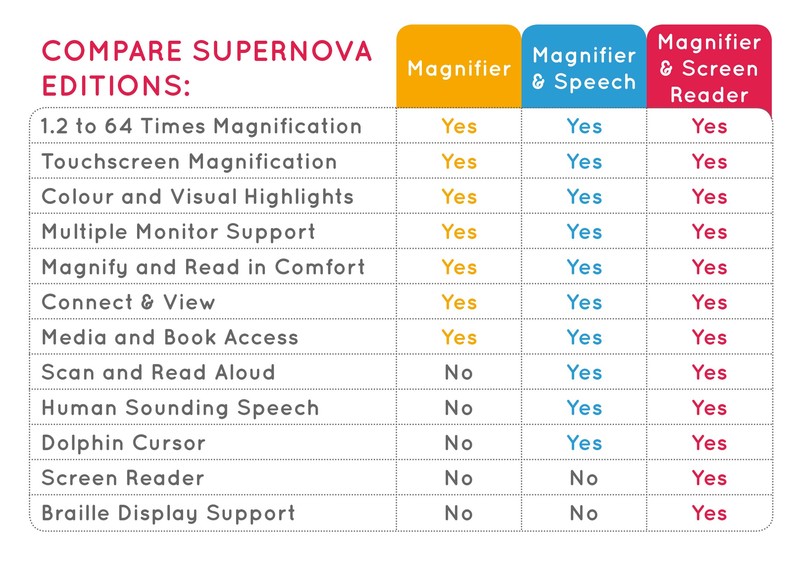
Dolphin SuperNova comparison chart

Features

Integrated Magnification and Speech
Experience the power of visual enlargement and clear spoken feedback working together for deeper understanding and reduced strain.

Natural-Sounding Voices
High-quality speech output reads documents and web pages smoothly, improving comprehension and comfort.

Customizable Display Settings
Adjust colors, brightness, and contrast to match your specific vision needs and preferences.

On-Screen Text Highlighting
Follow along visually as text is read aloud, reinforcing understanding and focus.

Flexible Viewing Modes
Switch between full-screen and split-screen views to maintain context while focusing on details.

Designed for Long-Term Accessibility
Adaptable features support changing vision needs over time.

Specifications

Technical Specifications

  • Software Type: Magnifier and speech software

  • License: Single user

  • Operating System: Windows

  • Magnification: Adjustable levels

  • Speech Output: Built-in text-to-speech

  • Display Modes: Full and split-screen options

Reviews

“I can see the screen and hear it at the same time. It has made working so much easier.” — Daniel, Accountant

“This software helped me finish reading long documents without exhausting my eyes.” — Karen, Graduate Student

“I feel more independent managing my personal business online.” — Frank, Retired Engineer

“The speech feature is clear and easy to follow.” — Melissa, Administrative Assistant

“It gave me back the confidence to use my computer every day.” — George, U.S. Navy Veteran

What's in the box?

  • Dolphin SuperNova Magnifier and Speech software license

  • Digital download access

  • Installation instructions

  • User documentation

  • Software Maintenance Agreement (1 year)

Frequently Asked Questions

Yes, it is designed for Windows-based computers and works with most major applications.
Yes, you can enlarge content and activate speech simultaneously for layered accessibility support.
Yes, it can read selected text or larger sections of documents and web pages.
Yes, many professionals use this software as part of accessibility accommodations in the workplace.
At New England Low Vision and Blindness, we provide personalized training to ensure you get the most out of your Dolphin SuperNova Magnifier & Speech – Single User.
New England Low Vision and Blindness offers financing options to make this technology more accessible. Please contact us for details.

What Our Customers Say

Hear from people whose lives have been transformed by New England Low Vision and Blindness.

stars

"Thank you so much for all your efforts and pics in providing mom with the CCTV. Your warm and gracious letter has given me and my two brothers Win & Scott great satisfaction and confidence that you have indeed made a happy woman out of Jane. I can’t tell you how much this will change her quality of life but I’m sure being in the business you’re in you have an idea. My best to you and your great company!"

placeholder-testimony
Peter R.

Consumer visiting with his mom

stars

"Working with NELVB has been a truly positive experience. I first connected with Scott over a decade ago to support one of my students, and his involvement made a lasting impact on both the student and their family. Since then, he’s continued to provide valuable support through demos and programs. It’s always been about what’s best for the kids, and that’s what matters most to me."

placeholder-testimony
Lynn

Teacher for the Visually Impaired"

stars

"Thank you again for an excellent visit yesterday. My dad and I appreciated the time you spent with us, your thorough explanations of the various options and of the Stella lamp. I could tell that he was extremely pleased at the thought of being able to once again manage his piles of papers. My hope is with that victory and order, he’ll feel empowered and ready to tackle some other matters in his life."

placeholder-testimony
Mary

Mary, Consumer from NH

Are You Ready to Unlock the Power of Assistive Technology?

Take the first step toward greater and confidence!
About New England Low Vision and Blindness

At New England Low Vision and Blindness, we bring hope through assistive technology, personalized training, and compassionate care. As a full-service provider, we offer a wide range of solutions for individuals who are blind, have low vision, or are hard of hearing, backed by experienced Technology Rehabilitation Trainers.

With access to nearly every major technology brand and custom training services, we help clients discover the best tools to meet their personal, educational, or professional goals.

Visit our showroom or schedule a no-obligation assessment at home, school, or work for a relaxed, 1-on-1 demonstration.

Easy Monthly Payments

Get the technology you need now and pay over time with Affirm. Simple monthly payments, no hidden fees—a smarter way to stay independent and enhance your life.

Delivery & Set-Up

Enjoy our Premium White Glove Service with Peace of Mind Warranty—your technology is hand-delivered, expertly set up, and thoroughly explained at your location.

Training & Tips

Get personalized training at your home, workplace, or school—right where you’ll be using the technology most. We help you build confidence in the environments that matter.